Share event photos in a guest album
Published August 27, 2026
After a birthday or dinner, the photos are scattered across chats and camera rolls. The guest album puts them on the event page: guests who are coming or maybe can upload with a free login, everyone at the event can browse them, and you still collect RSVPs without forcing an account just to reply.
How it works
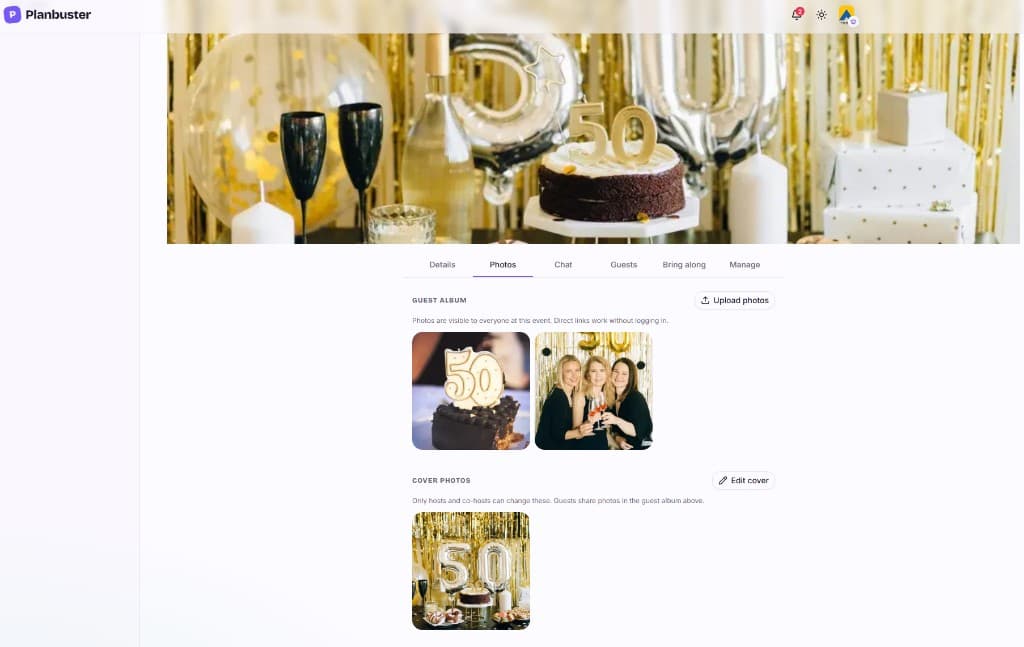
Open the Photos tab on your event. Under Guest album, guests who RSVP'd going or maybe — and hosts or co-hosts — upload with a free Planbuster login. Replying to the invite still needs no account; only uploading does, so the album stays tied to real people.
Photos shared in the event chat land in the same album, so one place holds the memories.
Guest album vs cover photos
Cover photos are for hosts and co-hosts — the invitation look on the event page. The guest album is where everyone shares what happened. Guests at the event can see the album; direct photo links work without logging in. If you want, you can also show the album on the public event page for anyone with the link.
The guest album is free. Uploaders can delete their own photos; hosts and co-hosts can delete any photo in the album.
Get started
Create an event, share the invite link, and open the Photos tab when people start sending pictures. Guests sign in once to upload — then the album grows on the same page as the date, map, and RSVPs.