Embed your events on your own website
Published August 23, 2026
If you run a venue, a band, a class, or a club, your dates probably live in two places: your own website and wherever people actually RSVP. The embed widget removes the double bookkeeping — publish on Planbuster once, and your site stays up to date by itself.
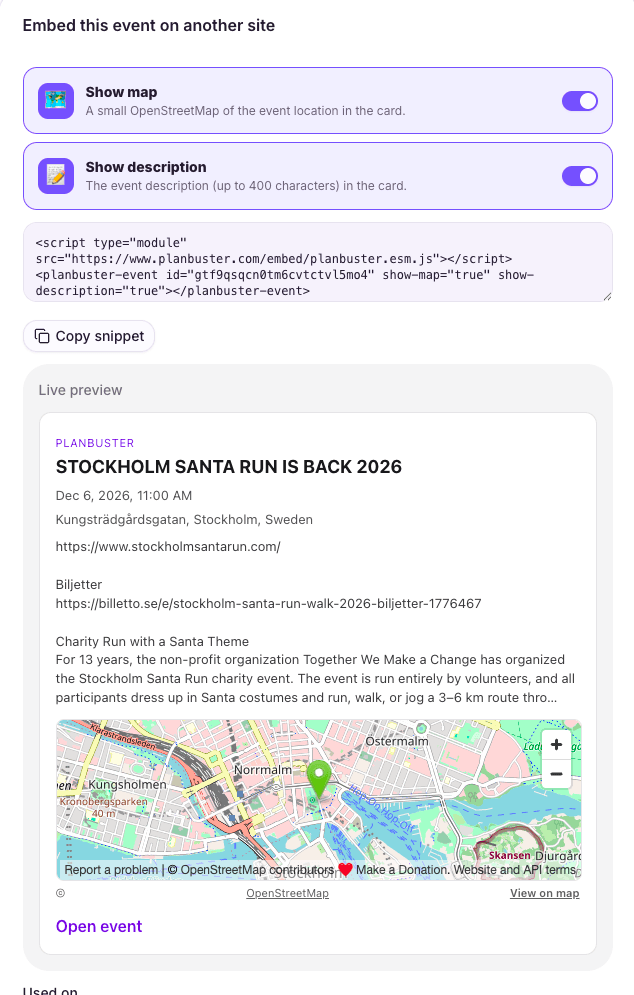
Three things you can embed
A single event card with date, place, and an RSVP button. A list of all upcoming public events on your creator page — perfect for a band's gig list or a teacher's course schedule. Or just a clean RSVP deep-link if you want your own design around it.
Made to behave on your site
The widget is a few lines of HTML and uses Shadow DOM, so your site's CSS doesn't leak in and the widget doesn't leak out. Pick a light or dark theme and set an accent color to match your brand.
It loads public event data only — never guest emails, allergies, or anything private.
Notion, WordPress, and calendars
Paste an event URL into Notion or WordPress and oEmbed renders it as a card automatically. Every creator page also has an ICS feed, so fans can subscribe to your upcoming public events straight from their calendar app.
Set it up
Copy the snippet from your public page and paste it into your site. The whole setup is a couple of minutes, and the widget updates itself whenever you publish or change an event.